
Guide for BLAST+ (ncbi-blast-2.8.0+ or later) usage
- blastp: search protein database(e.g., SwissProt db, NCBI-nr) using protein sequence query
- blastn: search nucleotide database(e.g., NCBI-nt, MMETSP_DB_clean.v2018.fa)using nucleotide sequence query
- blastx: search protein database with translated nucleotide sequence query
- tblastn: search translated nucleotide database with protein sequence query
- tblastx: search translated nucleotide database with translated nucleotide sequence query

blastp can usually provide better hit alignments than blastn, especially for distantly related species.This is partially because amino acids sequences are more conserved than nucleotides (Koonin and Galperin, 2002).
blastx translates the query sequence in all six reading frames and provides combined significance statistics for hits to different frames, it is particularly useful when the reading frame of the query sequence is unknown or it contains errors that may lead to frame shifts or other coding errors. Thus blastx is often the first analysis performed with a newly determined nucleotide sequence.
tblastn is useful for finding homologous protein coding regions in unannotated nucleotide sequences such as expressed sequence tags (ESTs) and draft genome records, ESTs are short, single-read cDNA sequences. They comprise the largest pool of sequence data for many organisms and contain portions of transcripts from many uncharacterized genes. Since ESTs have no annotated coding sequences, there are no corresponding protein translations in the BLAST protein databases. Hence a tblastn search is the only way to search for these potential coding regions at the protein level. Courtesy of the web source: https://guides.lib.berkeley.edu/ncbi/blast
General bugs
when mistakenly use blast options(e.g., blastn or blastp) or query sequence (amino acids or nucleotides sequences):
Error 1:
FASTA-Reader: Ignoring invalid residues at position(s): On line 7: 4, 8, 10, 13, 27-29, 32, 42, 45, 51, 53, 56, 63, 66-67, 70, 78
FASTA-Reader: Ignoring invalid residues at position(s): On line 8: 6, 9, 15, 19-20, 22, 28, 34-39, 45-48, 52
Solve1 : This is due to mistakenly using the blast options.
Error 2:
BLAST Database error: No alias or index file found for protein database [XXX.fa] in search path [/misc/scratch2/XXX:]
Solve 2: This is due to mistakenly treating nucleotide database as protein database.
Parsing Blast results
Using BLASTP search option to blast the amino acid sequences against uniport_db database.
./blastp -query XXX.fasta -db uniprot_db -out BLASTP_XXX_uniprot.xml -evalue 1e-5 -outfmt 5
The BLAST XML file (-outfmt 5) can include useful information comparing to the BLAST Tabular file (-outfmt 6), such as the aligned sequence, the sequence of the hit, and the description of hits into the database. However, the XML format is not human-readable.
Users will need to employ a commonly used parser (Blastxml_to_tabular.py) from the link(https://github.com/peterjc/galaxy_blast/blob/master/tools/ncbi_blast_plus/blastxml_to_tabular.py)(Cock et al.,2015), which is a custom python script, to convert a BLAST XML file to a desired tabular output (tab-delimited file).
python blastxml_to_tabular.py -c qseqid,qlen,salltitles,sseqid,slen,bitscore,qframe,pident,evalue,qstart,qend,sstart,send,length BLASTP_XXX_uniprot.xml > BLASTP_XXX_uniprot.tsv
“-c” option is to infer the displayed columns, there are 25 columns in total. User can infer the front 12 columns via “-c std”; infer 25 columns via “-c ext”;infer the personalized via using selected column name delimited by comma “-c qseqid,sseqid”
     1 qseqid    Query Seq-id (ID of your sequence)
     2 sseqid    Subject Seq-id (ID of the database hit)
     3 pident    Percentage of identical matches
     4 length    Alignment length
     5 mismatch  Number of mismatches
     6 gapopen   Number of gap openings
     7 qstart    Start of alignment in query
     8 qend      End of alignment in query
     9 sstart    Start of alignment in subject (database hit)
    10 send      End of alignment in subject (database hit)
    11 evalue    Expectation value (E-value)
    12 bitscore  Bit score
    13 sallseqid     All subject Seq-id(s), separated by ';'
    14 score         Raw score
    15 nident        Number of identical matches
    16 positive      Number of positive-scoring matches
    17 gaps          Total number of gaps
    18 ppos          Percentage of positive-scoring matches
    19 qframe        Query frame
    20 sframe        Subject frame
    21 qseq          Aligned part of query sequence
    22 sseq          Aligned part of subject sequence
    23 qlen          Query sequence length
    24 slen          Subject sequence length
    25 salltitles    All subject titles, separated by '<>'

    > python blastxml_to_tabular.py -o output.tabular -c std input.xml
    > python blastxml_to_tabular.py -o output.tabular -c ext input.xml
    > python blastxml_to_tabular.py -o output.tabular -c qseqid,qlen,salltitles,sseqid,slen,bitscore,qframe,pident,evalue,qstart,qend,sstart,send,length input.xml
#This is another way to parse BLAST outputs via using -outfmt '6 qseqid sseqid …'
#!/bin/bash
#$ -S /bin/bash
. /etc/profile
#$ -pe threaded 2
#$ -cwd
source activate blast
export BLASTDB= /misc/scratch3/rogerlab_databases/other_dbs/nr_010621
DB=nr
query=ATCG00670.1.fasta
blastp -db $DB -query $query -out /scratch2/xizhang/BLASTP_nr.tsv -num_threads 2 -outfmt '6 qseqid sseqid evalue pident qcovs length slen qlen qstart qend sstart send stitle'
source deactivate
Sep 6th,2022 Since Diamond is faster on BLASTP and BLASTx, this is another way using Diamond
#!/bin/bash
#$ -S /bin/bash
. /etc/profile
#$ -pe threaded 40
#$ -cwd
source activate /scratch2/software/anaconda/envs/diamond-2.0.7
#DB=nr
while read line
do

diamond blastp -p 40 -k 5 -e 1e-10 -f 6 qseqid sseqid pident length mismatch gapopen qstart qend sstart send evalue bitscore stitle salltitles --header -d /misc/scratch3/rogerlab_databases/other_dbs/nr_02032022/diamond_nr.dmnd -q $line -o BLASTP_nr.$line.tsv --sensitive

done <$1

conda deactivate
V5 NCBI database
The latest blast+ package can be found via https://ftp.ncbi.nlm.nih.gov/blast/executables/blast+/LATEST/
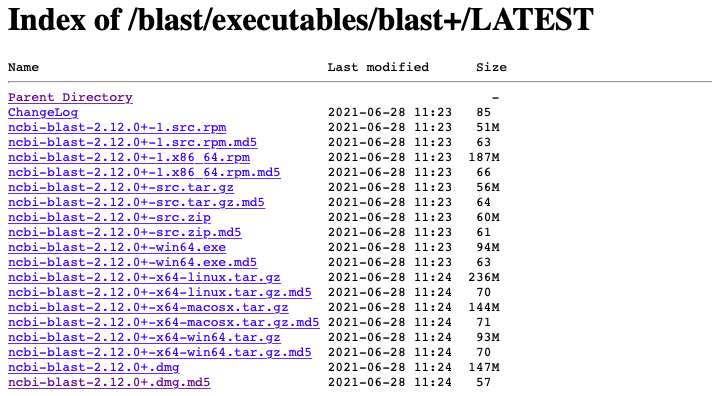
The V5 NCBI database can be found via https://ftp.ncbi.nlm.nih.gov/blast/db/v5. The good thing about V5 than V4 database is not just the former is faster, but also the option to screen out your interested taxonomy.
In order to limit your BLAST+ search by taxonomy, you’ll need to obtain the taxid(s) for your organism(s). Two options can be used here: “taxids” or “taxidlist”
This is to acquire the taxid list for your interested organism e.g.,bacteria
./get_species_taxids.sh -n bacteria
get_species_taxids.sh script is from the blast+ package under the bin directory. Taxid for bacteria is 2. Then acquire a list of taxonomy ids from bacteria species.
./get_species_taxids.sh -t 2 > 2.txids
Using 2.txids to limit the NCBI v5 database search scope is far more efficient.
./blastp –db nr –query QUERY –taxidlist 2.txids –outfmt 5 –out OUTPUT.tab
./blastp –db nr –query QUERY –taxids 1117,1118,1119,1121 –outfmt 5 –out OUTPUT.tab
If use “taxids” option, use comma to separate different organisms.e.g., different cyanobacteria organisms: 1117,1118,1119,1121
Note: Please refer to the guide for the most updated information. https://ftp.ncbi.nlm.nih.gov/blast/db/v5/v5/blastdbv5.pdf

<Last updated by Xi Zhang on Sep 3rd,2021>