
Table of Contents
Gene prediction curation with IGV
Joran Martijn (February 2023)
After applying one or more gene prediction algorithms on your genome, you would do well to curate the predicted gene models manually. Even the most advanced algorithms to date can still make mistakes that are otherwise obvious to the human eye.
The curation process described here aims to compile all the necessary information in a single screen in the graphical user interface of the Integrated Genomics Viewer (IGV), which allows you to edit genes one by one if deemed necessary.
Example
An example view:
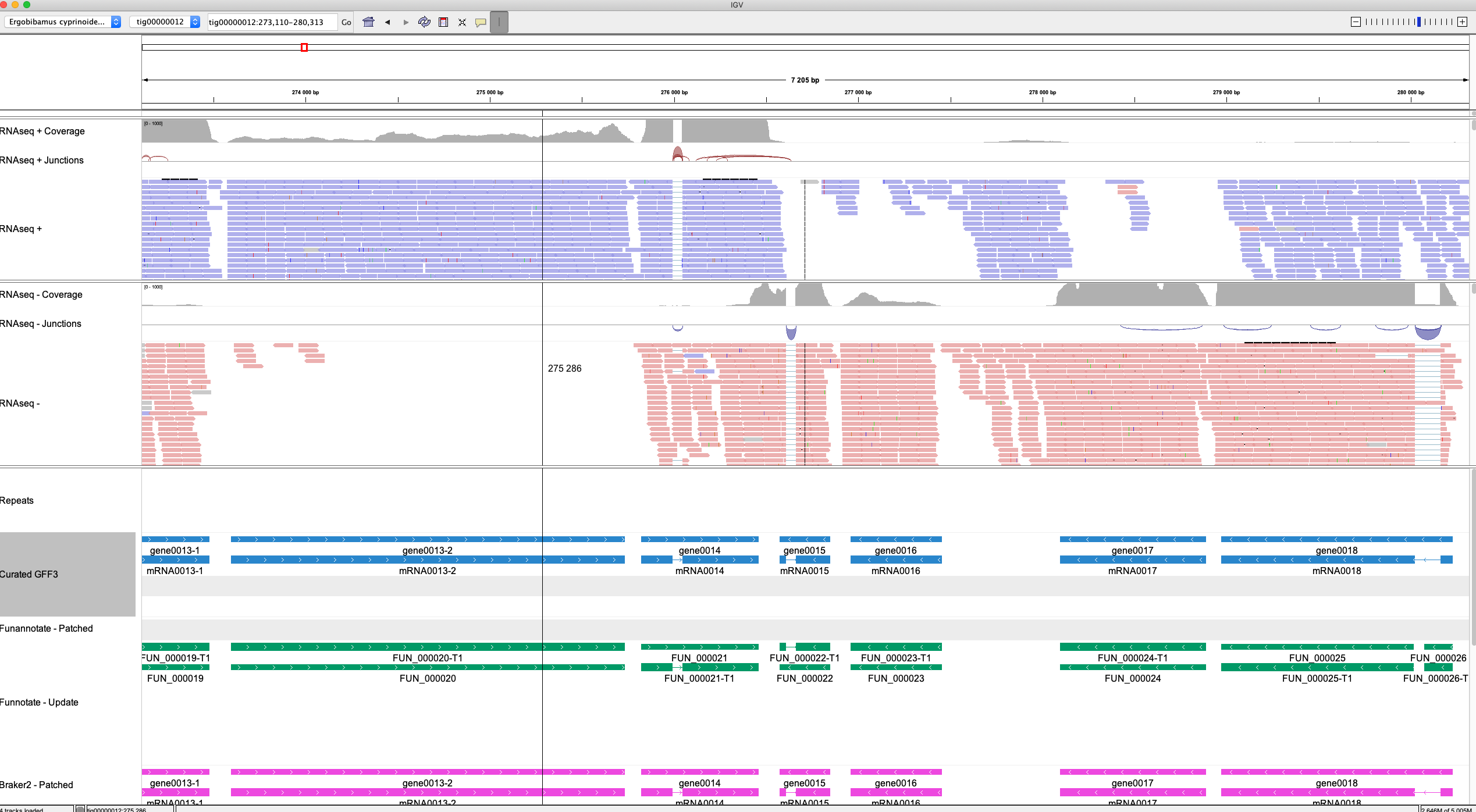
This example integrates the following source of information (top-to-bottom):
- Location in the genome
- RNAseq coverage levels
- RNAseq intron junctions
- The RNAseq reads mapped to the Ergobibamus genome sequence
- The Ergobibamus genome sequence (visible when zooming in)
- Repeats predicted by RepeatMasker
- The gene models predicted by Funannotate, Braker2 and various GeneMark algorithms (not visible in the screenshot)
Strand-specific RNAseq reads
Note that here two distinct RNAseq tracks are loaded. One for all the reads stemming from transcripts transcribed from the positive strand of the genome, and one for all those transcribed from the negative strand of the genome. This kind of strand-specificity information is only available when a RNAseq library protocol was used to retains this information, for example the dUTP method. I believe nowadays this is the default so it should be available to you.
If you used HISAT2 with –rna-strandness RF to map your RNAseq reads to your genome, all “positive” reads will have the tag XS:A:+, while all “negative” reads will have the XS:A:- tag. One can separate the two types of reads from the HISAT2-generated BAM file using the following command:
samtools view -b --tag XS:+ <rnaseq.bam> > <rnaseq.pos.bam>
samtools index <rnaseq.pos.bam> <rnaseq.pos.bam.bai>

samtools view -b --tag XS:- <rnaseq.bam> > <rnaseq.neg.bam>
samtools index <rnaseq.neg.bam> <rnaseq.neg.bam.bai>
GC content
It may be nice to have a track in IGV that shows you per-window-size %GC. Here I generate a so-called bedGraph formatted file that can be loaded into IGV
cat Ergobibamus_cyprinoides_CL.scaffolds.fa \
    | seqkit sliding -W 50 -s 25 \
    | seqkit fx2tab -n -g \
    | sed -e "s/_sliding\:/\t/" -e "s/\-/\t/" -e "s/\s+/\t/g" \
    > ergo_gc_content.bedgraph
You can play with the window size -W and overlap -s parameters to fine tune it to your own liking. You can either load in this track via File → Load From File .. or through the JSON file (see below)
Loading into IGV
To load everything into a fresh IGV window, one can load each track in the old-fashioned way.
First load your genome with Genomes→Load Genome from File…, and then load each individual track with File→Load from File…. This is fine doing once, but if your IGV crashes for whatever reason, or becomes a tangled web of tracks or you accidentally removed your Sequence track (these things happen more frequently than you want) you will need to restart IGV and load everything from scratch, collapse/expand and color tracks as you desire, etc, etc again. This is a huge pain in the ass!
The second way would be to load everything manually as before, but then use File→Save Session… and reload sessions after crashing and restarting IGV.
The third, and my preferred way, is to load everything at once using a JSON file. See an example file below:
{
    "id": "ergo",
    "name": "Ergobibamus cyprinoides CL",
    "fastaURL": "ergo_cyp_genome.fasta",
    "indexURL": "ergo_cyp_genome.fasta.fai",
    "chromosomeOrder": [
        "tig00000012",
        "tig00000492",
        "tig00000016",
        "tig00000015",
        "tig00000496",
        "tig00000019",
        "tig00000498",
        "tig00000497",
        "tig00000079",
        "tig00000031",
        "tig00000018",
        "tig00000013",
        "tig00000513",
        "tig00000510",
        "tig00000506",
        "tig00000491",
        "tig00000445",
        "tig00000507",
        "tig00000505",
        "tig00000509",
        "tig00000514",
        "tig00000511",
        "tig00000092",
        "tig00000512",
        "tig00000494",
        "tig00000493",
        "tig00000495",
        "tig00000508"
    ],
    "tracks": [
        {
            "name": "Repeats",
            "type": "annotation",
            "format": "gff3",
            "url": "repeats.gff3"
        },
        {
            "name": "Curated GFF3",
            "type": "annotation",
            "format": "gff3",
            "url": "01_curated_purged.gff3",
            "color": "#2986cc",
            "displayMode": "EXPANDED"
        },
        {
            "name": "Funannotate - Patched",
            "type": "annotation",
            "format": "gff3",
            "url": "funannotate_predict_patched.gff3",
            "color": "#ff8200"
        },
        {
            "name": "Funnotate - Update",
            "type": "annotation",
            "format": "gff3",
            "url": "funnotate.gff3",
            "color": "#009966",
            "displayMode": "EXPANDED"
        },
        {
            "name": "Braker2 - Patched",
            "type": "annotation",
            "format": "gff3",
            "url": "curated_purged.contigs_012_016_492.gff3",
            "color": "#ed48df"
        },
        {
            "name": "Braker2 - Simplified",
            "type": "annotation",
            "format": "gff3",
            "url": "EVM.raw.simple.gff3",
            "color": "#f1c232",
            "displayMode": "COLLAPSED"
        },
        {
            "name": "GeneMark-ES",
            "type": "annotation",
            "format": "gff3",
            "url": "genemark_ES.gtf",
            "color": "#000000",
            "displayMode": "COLLAPSED"
        },
        {
            "name": "GeneMark-ET",
            "type": "annotation",
            "format": "gff3",
            "url": "genemark_ET.gtf",
            "color": "#bcbcbc",
            "displayMode": "COLLAPSED"
        },

        {
            "name": "RNAseq +",
            "type": "alignment",
            "format": "bam",
            "url": "rnaseq_vs_masked_ergo_cyp_genome.sort.pos_transcripts.bam",
            "indexURL": "rnaseq_vs_masked_ergo_cyp_genome.sort.pos_transcripts.bam.bai"
        },
        {
            "name": "RNAseq -",
            "type": "alignment",
            "format": "bam",
            "url": "rnaseq_vs_masked_ergo_cyp_genome.sort.neg_transcripts.bam",
            "indexURL": "rnaseq_vs_masked_ergo_cyp_genome.sort.neg_transcripts.bam.bai"
        },
        {
            "name": "GC content",
            "type": "wig",
            "format": "bedGraph",
            "url": "ergo_gc_content.bedgraph",
            "graphType": "bar",
            "min": 20,
            "max": 80,
            "color": "#00dad7"
        }

    ]

}
Load a JSON file with Genomes→Load Genome from File…. If for whatever reason your file won't load, you can check your ~/igv/igv0.log and ~/igv/igv1.log log files. They may have some hints on why it doesn't want to load.
This has some advantages:
- Load everything in one go
- Set up a desired display order of contigs / chromosomes
- Set up “clean” names for each track
- Set up the colors for each track
- Easy to share as all settings are in a plain text file
- You could automatically generate such a file in a pipeline if you want
Unfortunately I haven't been able to get it to collapse / expand tracks. In theory it should work with “displayMode”: “COLLAPSED” or “displayMode”: “EXPANDED” but it doesn't seem to work. In addition, you would still need to collapse the RNAseq intron junction track and the coloring of the RNAseq reads manually.
"name": Desired display name for your track
"type": Type of track. Could be "alignment", "annotation" and perhaps other types
"format" : "bam" or "gff3" or "wig"
"url" : filename of the file you wish to load here
"fastaURL" : filename of the genome FASTA file
"indexURL" : name of the indexed BAM file (BAI) or FASTA file (FAI)
"color" : hexadecimal code of color you wish to use for the track
Adjust graphical settings
To color the RNAseq reads according to strandness, right-click on the track, then Color alignments by→first-of-pair strand
It may be useful to set a fixed y-scale of the coverage track. To do so, right-click on the coverage track, then Set Data Range, and enter your desired maximum value. I like 1000. To make the both tracks (positive and negative transcript coverage) comparable, set the same maximum value for both.
Navigating IGV
I highly recommend using hotkeys to navigate IGV as much as possible. Once you have selected a track on the left (by clicking on it), you can:
+        Zoom in
-        Zoom out
Ctrl+F   Move to the next gene feature
Ctrl+B   Move to the previous gene feature
Arrows   Move a bit to the left or a bit to the right
For some frustratingly unknow reason, IGV only displays the three forward frames, OR the three reverse frames. It is, as far as I know, not possible to display all six frames simultaneously. To swap between reverse and forward frames, click on small arrow of the Sequence track. To see the sequence track, you need to be sufficiently zoomed in.
Curating gene models
IGV is excellent for viewing your data, but unfortunately not so much for editing your files in place. My solution has been to have the GFF3 file with your gene predictions open in a separate window, and adjusting the coordinates / adding or removing introns and exons directly in the text file. To make your changes visible in IGV, you need to remove the track and reload it. To make editing GFF3 files easier, I strongly recommend organizing your GFF3 files such that there is an empty line between each gene.
For example:
tig00000016 EVM gene    1991975 1995790 .   -   .   ID=ctg016.gene0736;Name=gene0736
tig00000016 EVM mRNA    1991975 1995790 .   -   .   ID=ctg016.mRNA0736;Parent=ctg016.gene0736;Name=mRNA0736
tig00000016 EVM CDS 1991975 1995790 .   -   0   ID=ctg016.mRNA0736.CDS01;Parent=ctg016.mRNA0736
tig00000016 EVM exon    1991975 1995790 .   -   .   ID=ctg016.mRNA0736.exon01;Parent=ctg016.mRNA0736

tig00000016 Manual  gene    1995957 1996271 .   -   .   ID=ctg016.gene0737-1;Name=gene0737-1
tig00000016 Manual  mRNA    1995957 1996271 .   -   .   ID=ctg016.mRNA0737-1;Parent=ctg016.gene0737-1;Name=mRNA0737-1
tig00000016 Manual  CDS 1995957 1996271 .   -   0   ID=ctg016.mRNA0737-1.CDS;Parent=ctg016.mRNA0737-1
tig00000016 Manual  exon    1995957 1996271 .   -   .   ID=ctg016.mRNA0737-1.exon01;Parent=ctg016.mRNA0737-1

tig00000016 Manual  gene    1996590 1997048 .   -   .   ID=ctg016.gene0737-3;Name=gene0737-3
tig00000016 Manual  mRNA    1996590 1997048 .   -   .   ID=ctg016.mRNA0737-3;Parent=ctg016.gene0737-3;Name=mRNA0737-3
tig00000016 Manual  CDS 1996590 1997048 .   -   0   ID=ctg016.mRNA0737-3.CDS;Parent=ctg016.mRNA0737-3
tig00000016 Manual  exon    1996590 1997048 .   -   .   ID=ctg016.mRNA0737-3.exon01;Parent=ctg016.mRNA0737-3
Curation example
Below we see an example of a potential gene that was missed by the gene prediction algorithm on the reverse strand. By checking the sequence strand and carefully moving from potential exon to exon, we can see that there is a potential gene here.
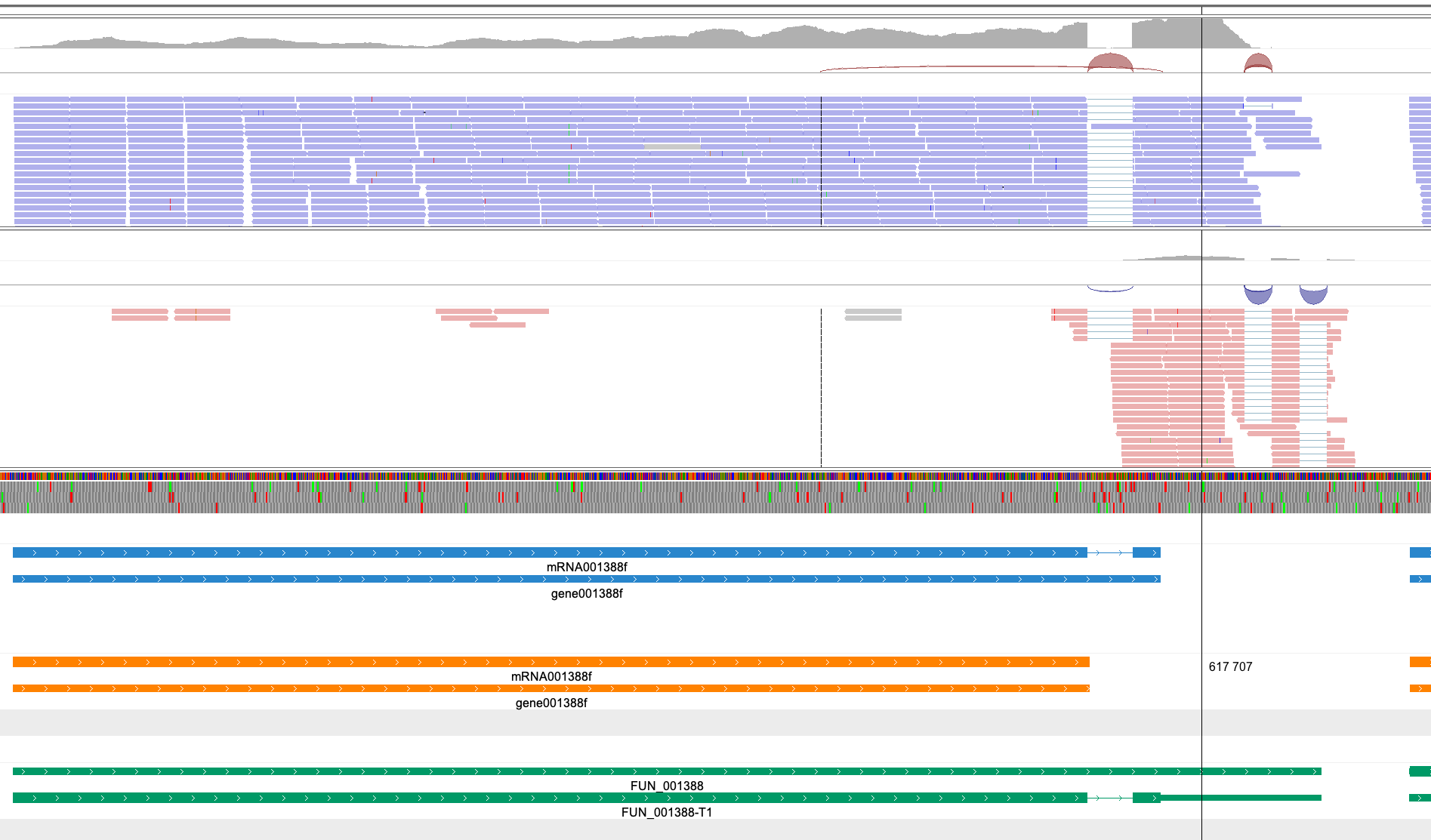
Using the ruler line of IGV (toolbar on the top, the last button on the right), we can determine the right coordinates, and we add this gene in our curated GFF3 file:
tig00000015 funannotate gene    617629  617991  .   -   .   ID=ctg015.gene001388-2f;Name=gene001388-2f;
tig00000015 funannotate mRNA    617629  617991  .   -   .   ID=ctg015.mRNA001388-2f;Parent=ctg015.gene001388-2f;Name=mRNA001388-2f
tig00000015 funannotate CDS 617629  617785  .   -   1   ID=ctg015.mRNA001388-2f.cds;Parent=ctg015.mRNA001388-2f
tig00000015 funannotate exon    617629  617785  .   -   .   ID=ctg015.mRNA001388-2f.exon03;Parent=ctg015.mRNA001388-2f
tig00000015 funannotate CDS 617835  617886  .   -   2   ID=ctg015.mRNA001388-2f.cds;Parent=ctg015.mRNA001388-2f
tig00000015 funannotate exon    617835  617886  .   -   .   ID=ctg015.mRNA001388-2f.exon02;Parent=ctg015.mRNA001388-2f
tig00000015 funannotate CDS 617937  617991  .   -   0   ID=ctg015.mRNA001388-2f.cds;Parent=ctg015.mRNA001388-2f
tig00000015 funannotate exon    617937  617991  .   -   .   ID=ctg015.mRNA001388-2f.exon01;Parent=ctg015.mRNA001388-2f
Note that I didn't explicitly defined intron features here, only gene, mRNA, CDS and exon features. The introns are implied as the coordinate space between exons. You can also explicitly define them if you want. IGV will work with either formatting choice.
Reload the Curated GFF3 track with the updated GFF3 file:
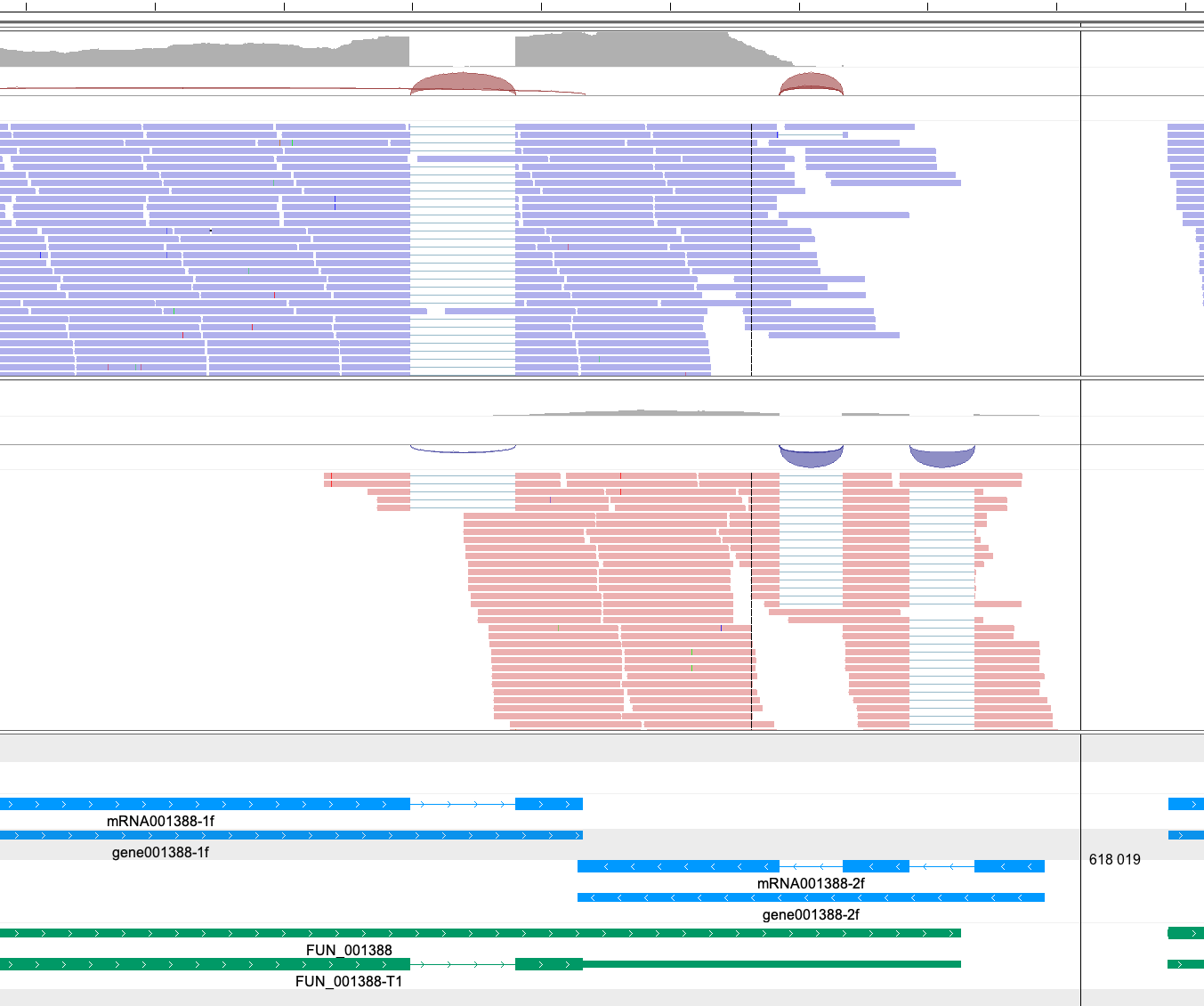
Also zoom in until you see the protein sequence to make sure that you haven't accidentally introduced any frameshifts (usually visible by premature STOP codons)
GFF3 Format
To edit GFF3 files, you must have a good understanding of the format. GFF3 is an extension of the older GTF format and an attempt to standardize the gene annotation format. The official rules and guidelines can be found on their GitHub page: GFF3 Format. This is quite a long and extensive page. For our purposes, we'll mainly need to know the following things:
- GFF3 files are tab-delimited, and consist of 9 columns
- Each line defines 1 feature. For example, gene, mRNA, exon, CDS, intron, etc
The 9 columns are as follows:
| Column | Description |
|---|---|
| SeqID | Name of contig, chromosome, etc |
| Source | Source of the feature. E.g. genemark, braker, etc |
| Type | gene, mRNA, exon, intron, CDS etc |
| Start | Start coordinate |
| End | End coordinate |
| Score | Some kind of score. . if not defined |
| Strand | + or - |
| Phase | 0, 1, or 2. Only relevant for CDS features |
| Attributes | tag=value; tag=value; See below |
Phase is not the same as the reading frame. In short,
0means that the first available codon starts on the 1st base of the feature1means that the first available codon starts on the 2nd base of the feature2means that the first available codon starts on the 3rd base of the feature
Thus, the CDS corresponding to the first exon always has phase 0. CDSs of subsequent exons can have phases 0, 1 or 2.
For example, if the second exon of a gene has sequence CGTTACAGAGC…, and the CDS has phase 1, the first codon of this sequence starts at the G, i.e. C-GTT-ACA-GAG-C…. However, if it had phase 2, it would be CG-TTA-CAG-AGC.
The Attributes field contains all other information regarding the feature and has a number of tag=value; fields. Most common fields are the ID, Name and Parent.
As the name implies, IDs are identifiers of your features. An ID of a feature must be unique within the entire GFF3 file. Of special consideration are discontinuous features. These are features that described by multiple lines in the GFF3 file and are in distinct regions on the chromosomes. In our case, CDS features are like this if there are multiple exons in a gene. Consider the following example:
tig00000015 funannotate gene    617629  617991  .   -   .   ID=ctg015.gene001388-2f;Name=gene001388-2f;
tig00000015 funannotate mRNA    617629  617991  .   -   .   ID=ctg015.mRNA001388-2f;Parent=ctg015.gene001388-2f;Name=mRNA001388-2f
tig00000015 funannotate CDS 617629  617785  .   -   1   ID=ctg015.mRNA001388-2f.cds;Parent=ctg015.mRNA001388-2f
tig00000015 funannotate exon    617629  617785  .   -   .   ID=ctg015.mRNA001388-2f.exon03;Parent=ctg015.mRNA001388-2f
tig00000015 funannotate CDS 617835  617886  .   -   2   ID=ctg015.mRNA001388-2f.cds;Parent=ctg015.mRNA001388-2f
tig00000015 funannotate exon    617835  617886  .   -   .   ID=ctg015.mRNA001388-2f.exon02;Parent=ctg015.mRNA001388-2f
tig00000015 funannotate CDS 617937  617991  .   -   0   ID=ctg015.mRNA001388-2f.cds;Parent=ctg015.mRNA001388-2f
tig00000015 funannotate exon    617937  617991  .   -   .   ID=ctg015.mRNA001388-2f.exon01;Parent=ctg015.mRNA001388-2f
All CDS features here point to the same CDS. This makes sense, as a CDS is biologically speaking a single object. They thus all have the same ID (ctg015.mRNA001388-2f.cds), but they are in distinct regions (617629-617785, 617835-617886, 617937-617991) and are hence discontinuous.
The Name attribute simply determines the display name of the feature in a genome viewer like IGV. Names do not need to be unique.
Parent attributes describe the hierarchical relationship of features. For example, a gene feature is considered a parent of an mRNA feature, which in turn is a parent of CDS and exon features. Such hierarchical relationships tell us which mRNA features belong to which gene features, and so on.
The ;, =, & and ,, as well as TAB, newline, carriage return and percent signs have special meanings in the attribute fields. They should therefore be avoided as much as possible in the value part of the field. If they must be included, replace these characters with percent encoding signs.
| Special character | Percent encoding sign |
|---|---|
; | %3B |
= | %3D |
& | %26 |
, | %2C |
| TAB | %09 |
| newline | %0A |
| carriage return | %0D |
% | %25 |
Validating curated gene models
We are only human.
Despite our best efforts to curate errors made by the automated gene prediction tools, during the curation process, we humans are prone to make our own mistakes! To help detect at least some of these unintentional oversights, I wrote a script, validate_gene_models_in_gff3.py.
It will do some sanity checks on all gene models in the GFF3 file:
- Does the gene feature have any children features?
- Do gene coordinates match with mRNA & tRNA coordinates?
- Does the start coordinate of the first CDS/exon match with the gene start?
- Does the end coordinate of the last CDS/exon match with the gene end?
- Is the cumulative length of all exons a multiple of 3?
- Does the translate CDS start with an M and end with a * (STOP)?
- Are there any premature * (STOP) in the CDS?
- If Blastocystis genome, and there is no STOP, does it end with a TGTTTGTT motif?
validate_gene_models_in_gff3.py -g Ergobibamus_cyprinoides_CL.recurated.gff3 -f Ergobibamus_cyprinoides_CL.scaffolds.fa
If everything is OK, it will report Gene models in provided GFF3 passed all checks!
If a certain feature did not pass a check, the script will prematurely terminate and report an error message. For example ValueError: The end coordinate of ctg012.gene0001-1 does not correspond to the last CDS end coordinate. Now you know where to go in your GFF3 file and fix the problem! After fixing it, rerun the tool.
You can also optionally print all protein CDS sequences in FASTA format with the –print_proteins option:
validate_gene_models_in_gff3.py -g Ergobibamus_cyprinoides_CL.recurated.gff3 -f Ergobibamus_cyprinoides_CL.scaffolds.fa --print_proteins > ergo_proteins.fasta
NOTE: Currently, the checks performed in the script assume that you haven't annotated any UTRs in your GFF3. If you have UTR (
three_prime_UTR or five_prime_UTR) features, for example the start coordinate of the first CDS will not match the start coordinate of the gene. It will thus throw an error, even though your GFF3 is perfectly fine. Something I'll have to fix in the future.
UPDATE (Jan 2025): It should now account for UTRs
Re-streamlining gene names
During your curation, you may be forced to make new gene names that stray from the original format. For example, if you found that gene FUN_000012 was actually two genes that were wrongly fused, you may have split them up into FUN_000012-1 and FUN_000012-2. This is perfectly fine, but may cause problems if you want to feed the curated GFF3 as input to for example funannotate annotate or funannotate update.
To re-streamline gene names, you can make use of the funannotate util gff-rename utility:
funannotate util gff-rename \
    --gff3 Ergobibamus_curated.gff3 \
    --fasta Ergobibamus_contigs.fasta \
    --locus_tag PYV62 \
    --out Ergobibamus_curated_renamed.gff3
Note that I have also added a new locus tag here, PYV62. This was the locus tag assigned to me by the NCBI genome submission portal.